Suppliers
Get the premium theme for your store
Access to the premium store design, and your store switched to it when you are ready.
Last reviewed 9 November 2026
The default theme is free for everyone. The premium theme is unlocked by the Plastic Tajir team on request. If your store was created on the premium theme, it is already unlocked: you can switch to the default theme and back without a request.
Steps
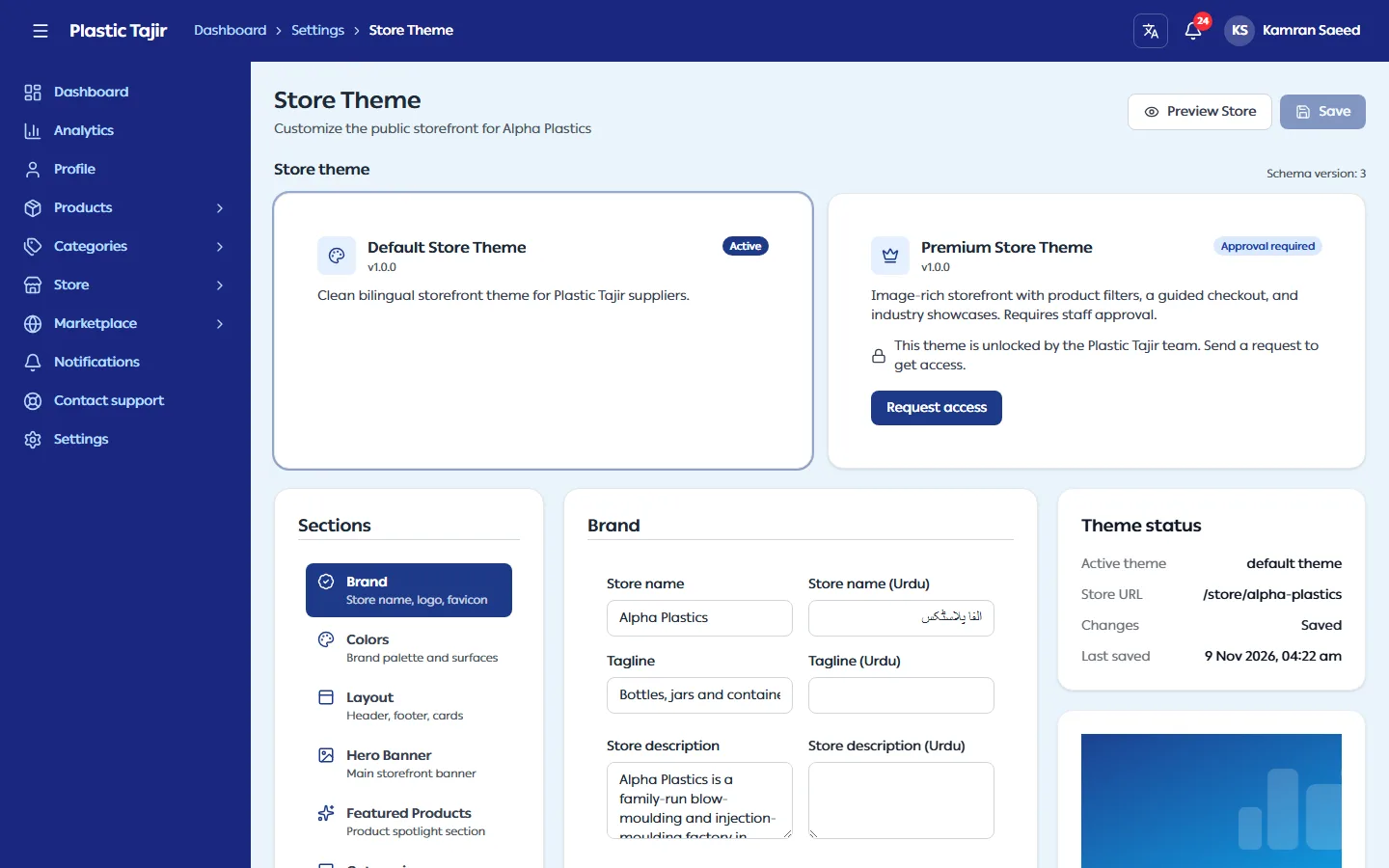
- Go to Settings → Theme Settings. The Store theme panel lists the available themes.
- On the premium theme, click Request access, add an optional Note for the reviewer, and click Send request. You see "Theme request sent".
- Wait for the review. You get a notification when it is decided.
- When it is approved, click Apply on the premium theme and confirm with Yes, switch theme.
What happens next
- Your public store uses the new theme right away.
- Each theme keeps its own design settings, so switching back and forth does not lose your work in either.
- The approval stays: you can switch to the default theme and back later without asking again.
- Unsaved Theme Studio changes are discarded when you switch, so save first.
Troubleshooting
| Problem | What to do |
|---|---|
| You changed your mind while the request is pending | Click Cancel request. |
| "Your last request was not approved." | Read the Reviewer note, fix what it asks (for example, add product images), then click Request again. |