Design your invoice
Your invoices look like your own business paper, with your logo, colour, NTN / STRN, terms and stamp.
1. Open the invoice design page
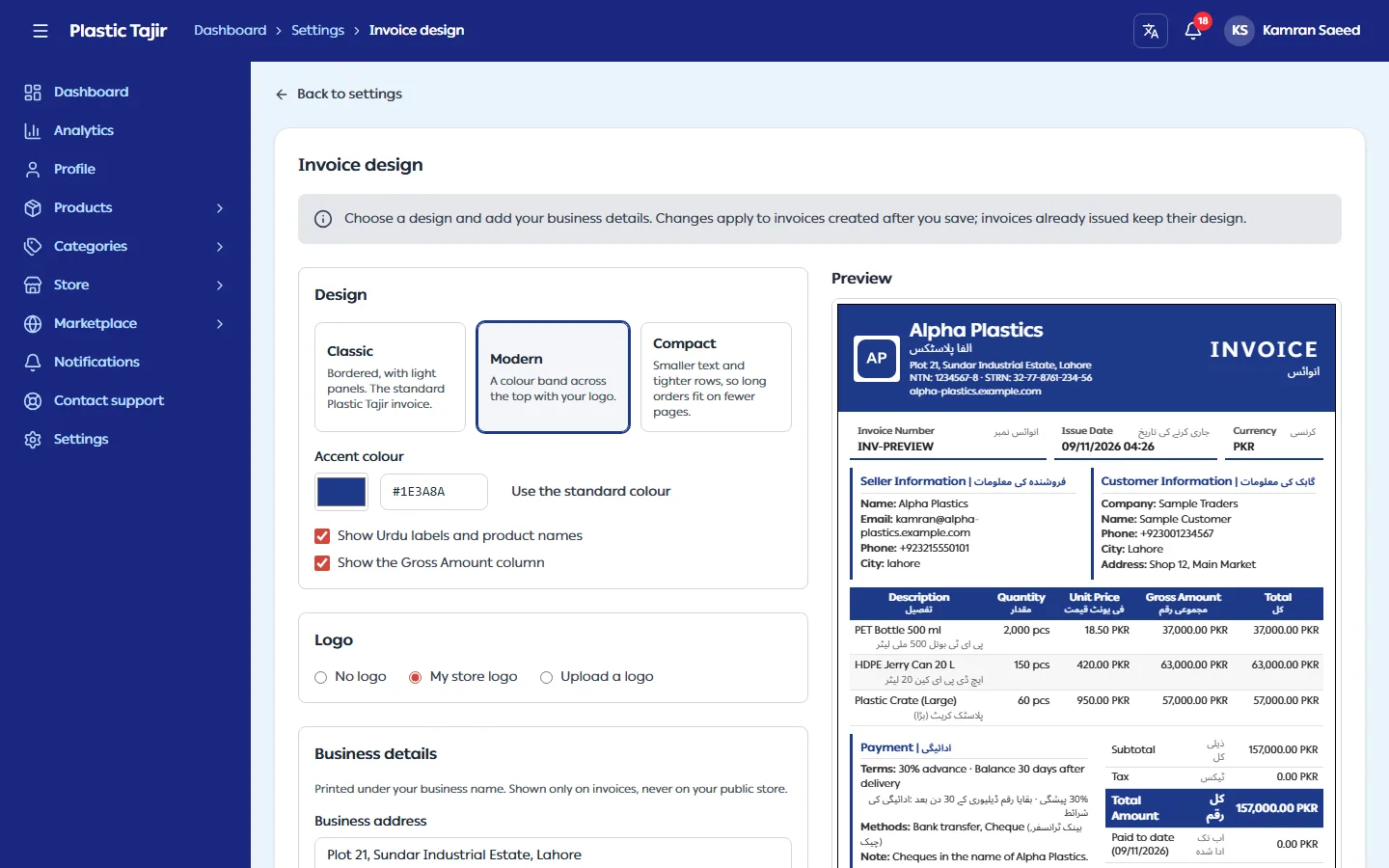
Go to Settings → Invoice design. The left side has the options; the right side shows a preview: a sample invoice with your business name and payment details. The preview updates a moment after you change something. Nothing is saved until you click Save design.
Your payment receipts use the same design and options as your invoices, so there is nothing separate to set up.
2. Choose a design
| Design | Looks like |
|---|---|
| Classic | Bordered, with light panels. The standard Plastic Tajir invoice. |
| Modern | A band in your colour across the top with your logo. |
| Compact | Smaller text and tighter rows, so long orders fit on fewer pages. |
3. Set the options
| Option | What it does |
|---|---|
| Accent colour | The colour of headings, lines and the Modern band. Very light colours are refused because they are hard to read on white paper. Use the standard colour goes back to the Plastic Tajir blue. |
| Show Urdu labels and product names | Untick for an English-only invoice. |
| Show the Gross Amount column | Untick to drop that column from the items table. |
| Logo | No logo, My store logo (the logo from Theme Studio), or Upload a logo just for invoices (PNG, JPG, WebP or SVG, up to 5 MB). |
| Business details | Address, NTN, STRN and website, printed under your business name. They appear on invoices only, never on your public store. |
| Terms and stamp | Your terms and conditions (English and / or Urdu), an image of your company stamp or signature, and the label under it (for example "For Ali Plastics"). |
| Show terms and stamp on invoices | The switch for that section. It is off until you add terms, a stamp or a label, then turns on by itself. Turn it off to hide the section from invoices: your text and stamp are kept, ready to show again. Clearing everything turns it off. |
| Footer note | A short line at the bottom of the invoice, in English and / or Urdu. |
Click Save design.
What you cannot change
Every invoice always shows the invoice number and date, your details and the customer's, the items, the totals, the payment details and "Powered by Plastic Tajir". The title is always Invoice: Plastic Tajir does not calculate sales tax, so the invoice cannot be called a sales tax invoice.
Which invoices change
Only invoices created after you save. An invoice is created when you confirm an order, and it keeps the design it was created with, so the copy your customer already has never changes. Invoices from before this feature keep the Classic look.
Troubleshooting
| Problem | What to do |
|---|---|
| "This colour is too light to read on white" | Choose a darker colour. |
| My store logo is greyed out | Your store has no logo yet. Add one in Settings → Theme Studio, or upload a logo for invoices. |
| "Links to other sites cannot be used on invoices" | Upload the image on this page instead of pasting a link. |
| An old invoice still shows the old design | That is expected: issued invoices keep their design. |
| My terms do not show on new invoices | Turn on Show terms and stamp on invoices, then Save design. |
| Everything is greyed out and there is no preview | Your store is suspended; you can read but not change the design. |